



Search
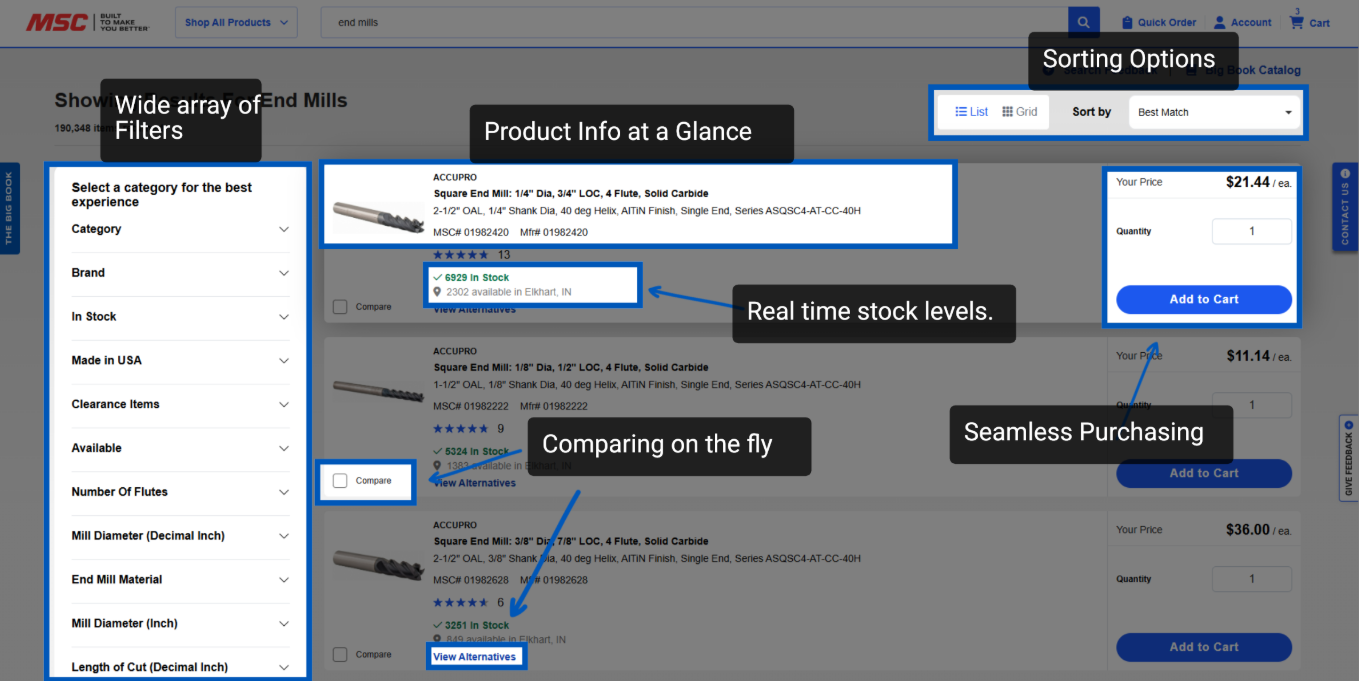
Search on MSCDirect.com helps you quickly find, compare, and purchase the products you need by combining powerful keyword search with smart filters and clear product details. Customers can search by keyword, item number, brand, or manufacturer part number, then narrow results using filters that automatically adjust to the type of product being searched. Each result provides pricing, availability, specifications, and customer ratings at a glance - making it easier to evaluate options and choose the right item. From the Search page, users can compare alternatives, adjust quantities, and add items directly to their cart, creating a fast and efficient path from product discovery to checkout.
Wide Array of Filters:
The search page offers a wide range of filters tailored to your search term (e.g., end mills), allowing you to quickly narrow down results by specifications such as overall length, shank diameter, and length of cut.
Category filters help you refine your search to the most relevant product groups.
Additional filters include options for in-stock items (to avoid back orders), products made in the US, and clearance items for special deals
Product Information at a Glance
Each product listing displays essential details: brand, description, MSC item number, manufacturer item number, customer ratings, and review scores.
Real-time stock levels are shown when logged into your account, including inventory available at your local distribution center if your default shipping location is set, helping you make informed purchasing decisions.
Multiple Sorting Options:
Sort items in the way that works best for your searching needs.
Seamless Purchasing Experience
Pricing and quantity selection are conveniently located at the top right of each product listing.
You can adjust quantities and add items directly to your cart from the search page, streamlining the ordering process.
Comparing on the Fly:
The search page offers a feature to view alternative products alongside your current selection.
Specifications that match across all alternatives are shown in white, while any differences are highlighted in yellow, making it easy to spot variations and choose the best fit for your needs.
This comparison tool streamlines decision-making by presenting all relevant details in one place.
More Finding Items Resources
Back to Finding ItemsTo request a quote, please login to your existing account or register a new one. This helps us provide you with a personalized experience and keep track of your requests.