Looking for full transcript of video? Read now
Chatter is one of the most frustrating problems machinists face. Whether you’re roughing with indexable inserts or finishing with solid end mills, chatter not only affects surface finish but can destroy tool life, ruin parts, and waste valuable machine time. Fortunately, it’s not just a fact of life, it’s a problem that can be solved with the right strategies.
This guide brings together field-tested insights and expert-level tips to help you tackle chatter from every angle.
What Is Chatter in CNC Machining and Why Does It Happen?
Chatter is a form of self-excited vibration. Unlike the occasional vibration from material variation, chatter is persistent and often shows up as visible tool marks, high-pitched noises during the cut, or degraded part quality. It happens when instability creeps into your machining system, whether from the tool, the holder, the workpiece, or even the way the tool engages with the material.
So if you’ve ever asked, “Why does my cutter sound like it’s screaming?” you’re probably dealing with chatter.
What Causes Chatter with Indexable Tooling?
Indexable cutters are incredibly efficient, especially for roughing, but they come with unique vibration risks. One of the biggest culprits is discontinuous cutting. When each insert enters and exits the material unevenly, the tool experiences intermittent engagement that can lead to bouncing, especially with aggressive lead angles.
Another key factor is uneven insert engagement, which can sometimes be a sign of runout. Whether due to worn cutter bodies, damaged holders, improper insert seating, or poor pocket cleanliness, even a slight imbalance can cause one insert to take a heavier cut than the others. This sets up rhythmic vibrations that grow over time. This same issue applies to solid end mills as well. If a tool is running out, one flute ends up doing more of the work, increasing the chance of chatter.
To prevent this, always start with clean inserts, clean pockets, and inspect holders for wear. Precision in setup is not just for solid tools; indexable tools need it too.
What Can You Do About It?
Use positive rake inserts to reduce cutting forces and stabilize the tool.
Look for lead angles that spread out the load more gradually.
Evaluate your radial engagement.
In many cases, reducing it minimizes side forces, but sometimes increasing it can actually stabilize the cut. Test what your setup responds to.
Why Do Solid End Mills Chatter Even With a Continuous Edge?
It’s easy to assume that a solid tool with a continuous flute would be immune to chatter. But that’s not always the case.
Are you using a long-reach tool in a deep pocket? That extended stickout adds deflection and reduces rigidity.
Is your flute geometry right for the material? The wrong helix angle or gullet design can lead to poor chip evacuation.
Are you slotting without proper chip clearance? Packed or re-cut chips can disrupt cutting forces and destabilize the tool mid-cut.
Chatter can creep in during finishing passes, tight inside corners, or slotting if you’re not evacuating chips efficiently or if the tool lacks the rigidity and geometry suited to the job. Even with the right setup, runout can quietly sabotage performance, causing one flute to do more work than the others, amplifying vibration, and wearing tools unevenly.
When chasing chatter, don’t just look at the tool geometry. Check your holder condition, setup precision, and runout at the tip.
What Helps?
Solid tools respond really well to advanced geometries:
Variable pitch and unequal flute spacing break up harmonics and reduce resonance.
High helix angles reduce radial cutting force and improve chip evacuation, especially in aluminum.
Polished flutes lower friction in sticky materials like stainless or titanium.
Wiper flats don’t stop chatter, but they can hide its effects and leave a better floor finish, especially during pocketing.
Should I Adjust RPM or Feed to Fix Chatter?
Yes, and not just once. Many machinists ask: Will increasing my RPM fix chatter? It depends, but small changes (as little as 5–10%) can make a big difference by shifting you out of a harmonic range (Adjusting speed and feed).
Similarly, slowing down isn’t always the answer. Running too slow can cause rubbing, which is just as bad, if not worse, than cutting too aggressively. Instead, focus on maintaining the correct feed per tooth to keep chip load steady and predictable.
And don’t forget about radial engagement. While smaller stepovers generally reduce side force, going too light can cause tool rub. A good rule of thumb is to start around 20–30% radial engagement and tune from there.
Can Coolant Help Reduce Chatter?
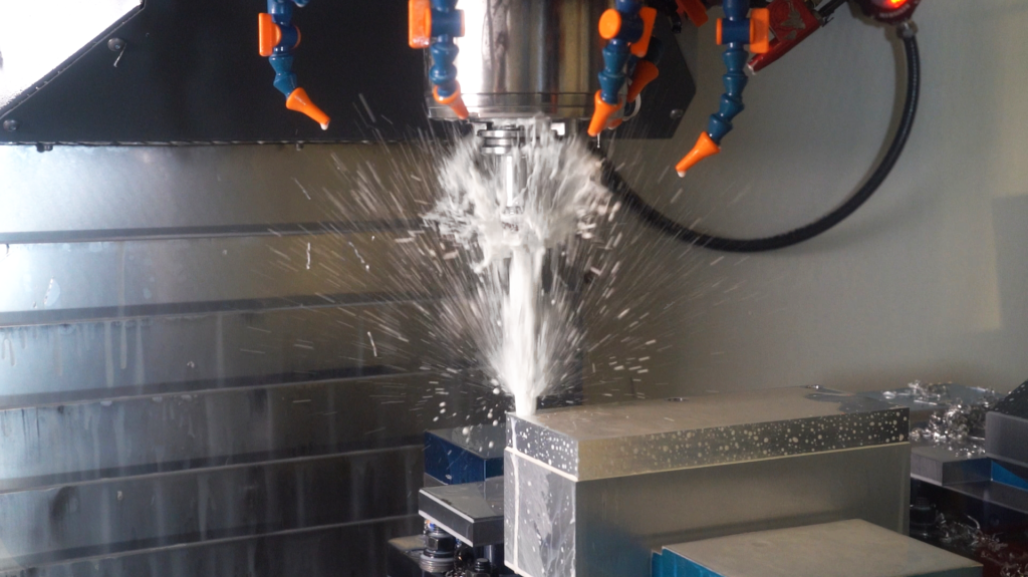
Absolutely, but not in the way you might think. Does coolant stop vibration? Not directly. But it plays a critical supporting role by stabilizing temperatures and improving chip flow.
Through-coolant gets right to the point of cut, especially useful for deep pockets or hard-to-machine alloys.
Flood coolant works fine for many indexable roughing cuts, but may struggle in deep holes or high-speed operations.
High-pressure systems (1000+ PSI) are ideal for pushing chips out during deep drilling and preventing re-cutting.
The key? Keep the chips moving and the tool cool. Both reduce the variables that feed vibration.
How Much Does Tool Overhang Matter?
A lot more than people expect.
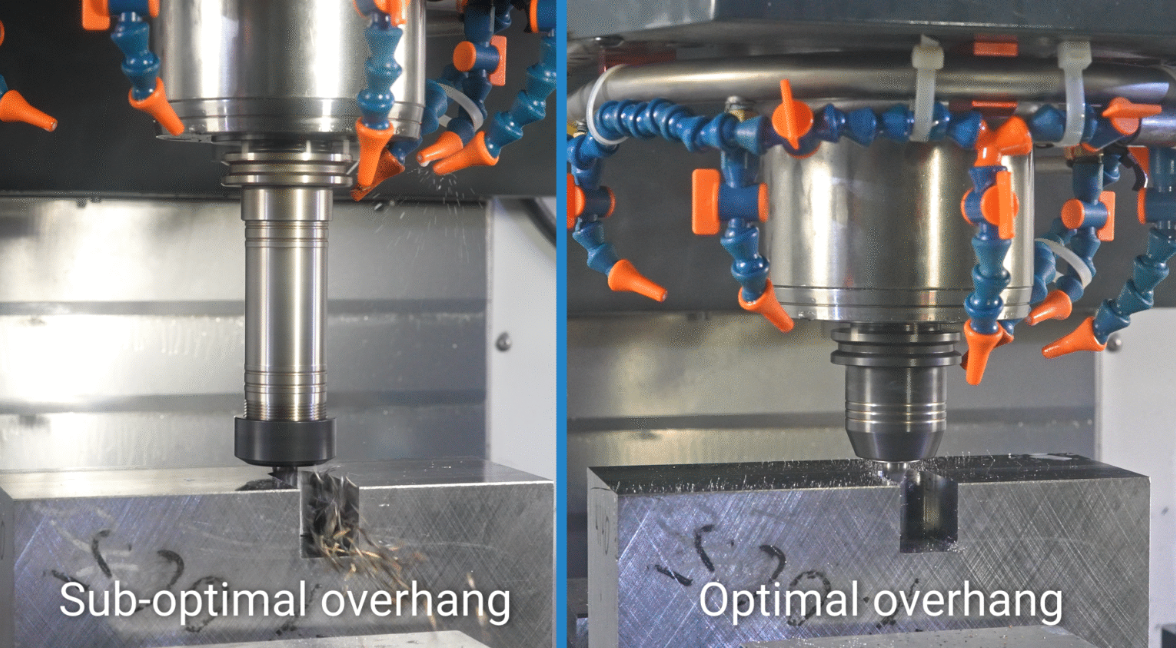
How much deflection can I reduce by shortening my stickout? Roughly 50% deflection reduction with a 20% reduction in tool length. That’s a massive gain in rigidity with a relatively small adjustment.
Where possible, minimize overhang and use the shortest tool length that still allows clearance. Rigidity starts at the setup.
How Does Material Choice Affect Chatter?
Material selection plays a huge role in chatter control. Each material brings its own challenges, from thermal conductivity to work hardening to chip formation. Here’s how to think about it: Aluminum
Performs well with high helix, polished flutes, and sharp edges.
Watch out for chip packing. Use tools designed for efficient evacuation.
High speeds are generally effective, but too much stickout can still cause vibration.
Stainless Steel
Work-hardens quickly, creating tougher cutting conditions.
Requires stronger geometries (lower helix, positive rake) and excellent chip control.
Coolant is essential. Use through-coolant tools to manage heat.
Titanium
Prone to chatter due to its low thermal conductivity and elasticity.
Use low radial engagement, high axial strategies (adaptive milling is key).
Sharp tools degrade fast. Look for edge prep and coatings that handle heat and wear.
Carbon Steel
Moderate machinability, but hardness can vary.
A balanced tool with medium helix and moderate chip thinning geometry often performs well.
Watch for built-up edge (BUE). Polished flutes and consistent coolant can help.
Cast Iron
Brittle but easy to cut, and often produces powdery chips.
Typically low risk for chatter, but vibration can still happen if the setup is unstable.
Use rigid setups and consistent feed rates to avoid tool bounce in interrupted cuts.
Inconel / Nickel Alloys
Tough, work-hardening, poor heat dissipation.
Needs low stepovers, steady engagement, and coated tools.
Run slower but maintain aggressive feed per tooth to avoid rubbing.
Composites / CFRP
No ductility, fracture-based cutting.
Use diamond-coated or polycrystalline diamond (PCD) tools.
Chatter often comes from tool resonance. Use minimal overhang and high-rigidity holders.
Bottom line: Don’t treat all materials the same. Matching tool geometry, feed strategy, and coolant to your material type is one of the fastest ways to eliminate chatter at the source.
Continue reading this blog in its entirety here to learn if runout can cause chatter and the role of adaptive toolpaths in combating chatter.
This article was previously featured on Kyocera's blog.