



Fluke 729 Pro Automatic Pressure Calibrator | How to Perform a Pressure Calibration Test
Learn how to perform a pressure calibration test on a Fluke 729 Pro Automatic Pressure Calibrator.
Learn how to perform a pressure calibration test on a Fluke 729 Pro Automatic Pressure Calibrator.
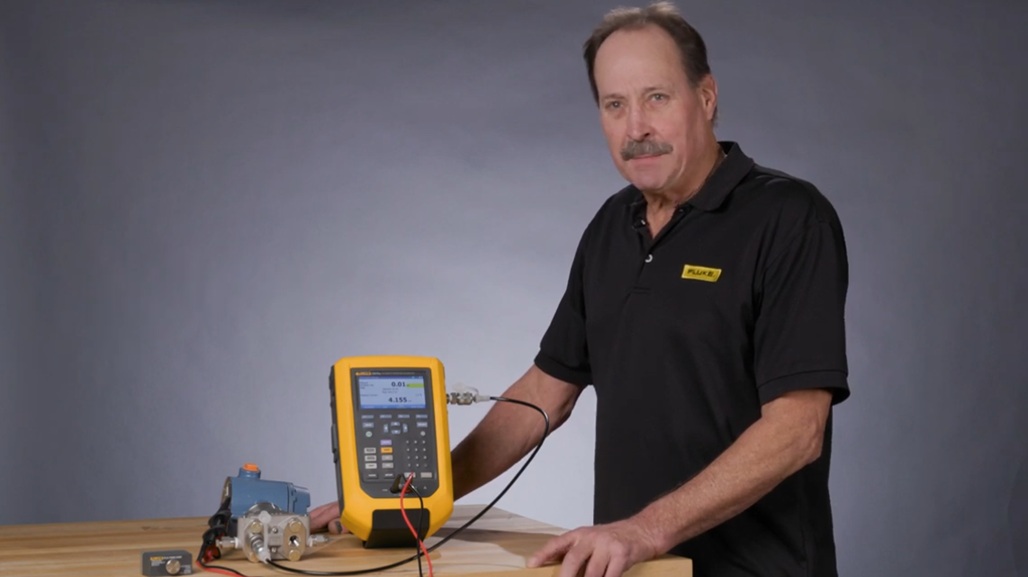
The Fluke 729 Pro Automatic Pressure Calibrator has been designed specifically with process technicians in mind to simplify the pressure calibration process and provide faster, more accurate test results. Technicians know that calibrating pressure can be a time-consuming task, but the 729 Pro makes it easier than ever with an internal electric pump that provides automatic pressure generation and regulation in an in an easy-to-use, rugged, portable package.
Learn how to perform a pressure calibration test on a Fluke 729 Pro Automatic Pressure Calibrator in this short video.
This video previously appeared on Fluke's YouTube channel.
Hi, I'm Jim Shields, Fluke's product manager for Process Calibration Tools. Today, I'd like to show you a pressure calibration test being performed by the 729 Pro on a Rosemount 3051 pressure transmitter.
To begin the test, we have to get all connected to the milliamp jacks and we'll be powering the transmitter and recording the milliamp signal as drawn from the 24 volt supply and the output pressure of the 729 Pro is connected to the input of the transmitter. To begin the test, we would initiate the test by selecting HART for HART communication. I would turn on loop power and turn on the 250 ohm resistor. And here's the tag number that was found. I presscontinue. And the calibrator is reading the HART device configuration of this transmitter for our testing.
So if I select, notice initially we're on HART data. If I select HART data, we can see here how the device is configured via the HART communication. Now we can see this transmitter has a range of 0 to 100 PSI. Select BACK and now the next option, Calibrate (Ad hoc) will use that device configuration to preconfigure the calibrator for the calibration test. So I select 3. Now notice it's automatically set up to calibrate zero to 100 PSI based on the HART configuration of this particular device. If I press continue, we can see the test tolerance and the number of test points we're going to test. If I press continue and then auto test, now we're in the automatic calibration and documenting mode. The 729 Pro is going to apply pressures of 0, 50, 100, and then 50, and 0 PSI while recording the 4, 12, 20, 12, and 4 milliamp values for the specific pressures that are being applied and calculate pass, fail, and errors.
Right now, we're going to the first test point at 50 PSI. Once it gets within 10 points, you'll see it shows STABLE. And after 5 seconds, it'll then go to the next point, which is 100 PSI. Now it's going to 100 PSI. And you see the milliamp value being recorded and its error percent. Now after 100 PSI it's reducing the pressure to 50 PSI to recheck the 50% point for hysteresis. STABLE, error percent, and the milliamp value being recorded and then the final test point zero PSI and we'll see our test summary.
So here's our post-test summary. Here's the ideal test point pressure, the actual applied pressure, the milliamp that was measured, and the milliamp error percentage span. Now, since we had a .02% test tolerance typed in for our test, all of these errors are out of that particular test tolerance, and this is showing as a failed as found test. So adjustment would be necessary using the HART utilities in the 729 Pro which we'll show in a subsequent video. Thank you for your time viewing this video.
For more information, please contact your local Fluke representative or go to fluke.com and look for pressure calibration. Thank you.

Fluke® Tools Corporation founded in 1948 is the world leader in compact, professional electronic test tools. Fluke tools range from electrical test equipment, precision measurement & quality control to HVAC. Fluke products are designed for day-to-day field troubleshooting and maintenance of electrical systems, electrical power systems, HVAC/R systems, and associated equipment. Find a wide variety of Fluke electrical test tools at mscdirect.com.



To request a quote, please login to your existing account or register a new one. This helps us provide you with a personalized experience and keep track of your requests.